C++ class padding and memory layout #
I would imagine that most of you are already aware of the sizes of fundamental types, by fundamental I mean data types like short, int, long, char… All these, differ depending on things like architecture (32 vs 64 bits) or even the compiler you are using.
Of course, it’s important to know about them, to avoid overflows or losing information due to conversions, whether they are explicit or implicit. But there is not much to say about these sizes, they just are. The only thing the C++ standard dictates are the minimum sizes (in bits) for their implementation.
Nevertheless, this is not what I want to talk about. Have you ever wondered what is the size of a class like this one?
class A{
    int int_1;
    short short_2;
    int int_3;
};
And what about an empty class? Or a derived class? This is not just about micro optimizations, you are rarely going to be in a situation where saving a couple of bytes leads to a massive performance improvement, and if you do, please tell me where I can apply for that job! But knowing how a class is structured underneath, will give you a broader view in different topics like casting or inheritance.
Before starting, during this article I will be assuming the following sizes: char: 1 byte, short: 2 bytes, int: 4 bytes, long: 8 bytes and pointer: 8 bytes. These are the typical sizes if you work on a 64 bit computer, although, by the end of the article you will be able to transfer what you have learnt no matter the underlying sizes.
1 - Empty class #
Let’s start with the easiest one, the empty class.
class A{

};
It’s rational to think the size of an empty class is 0, since there is nothing to store. However, if we instantiate an object of such class, where does its memory address begin and end? Could we store an infinite number of class A objects in the same memory address?
Well, obviously not! That is why even if a class has no data members it takes the minimum memory storage, 1 byte.
A a;
std::cout << sizeof(a); // This prints 1
2 - Functions #
What about member functions? We don’t have to take them into account, programs are separated into data and code. And member functions are no exception, the size of this class is still 1, it’s considered to be empty.
class B{
    int foo(){
        return 1;
    }
};
However, there are some type of functions that will affect the size of the class, we will talk about that later.
3 - Data members #
Let’s start with the interesting part. How big is this class?
class A{
    private:
        int int_1;
        int* ptr2;
};
Some of you might have summed the sizes of the data members, 12 bytes, which is not a bad approach, we will definitely have to take those into account. But, there is another thing we need to look at: the placement.
When thinking about memory you shouldn’t view it as just contiguous bytes. CPUs don’t access specific bytes, they access blocks of words. And those blocks have to be multiples of 8, you either access 0-7 or 8-15, but you can’t request a single read of bytes number 5-12 in old arquitectures, or it’s highly inefficient in new ones. This is just how the hardware works. And again, I’m assuming 64 bit architectures, the number bytes of a read will be defined by the word size of your machine.
With this information you can now imagine memory as a layout that looks like this, where each cell is a byte. But also divided into blocks of 8 bytes.
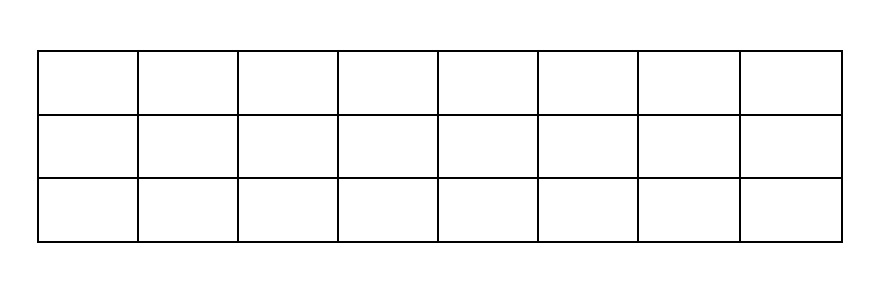
Let’s now place the variables in this grid:
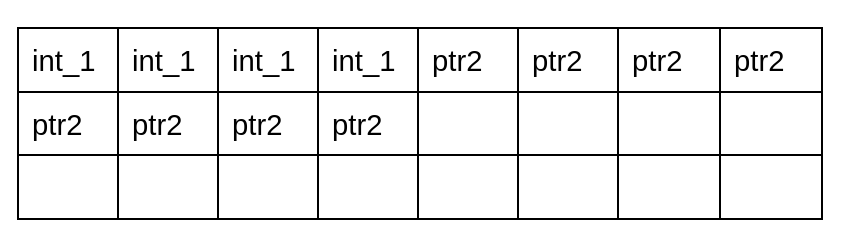
I bet you already can see the problem. The int pointer is split across two 8 byte blocks. This means that we need two cycles to access it, 0-7 and 8-15. This is incredibly inefficient. The solution for this is padding. The compiler will add empty data between the two data members.
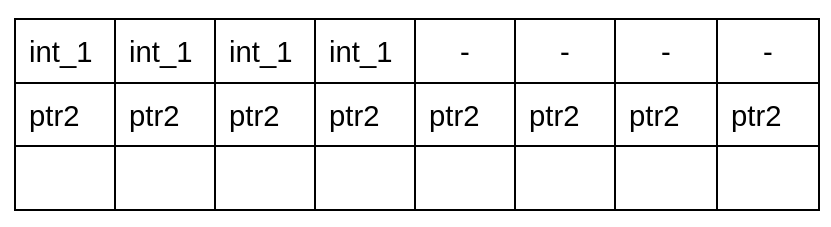
Now, our class is considered to be aligned. We can access the pointer in a single read. It’s typically much more worth it adding those 4 extra bytes of space, and optimizing the retrieval of the data.
Let’s see another example.
class A{
    char c1;
    int i2;
};
For this class we will also have some padding, but in this case, it’s different, we are not moving the int to the next 8 byte chunk, as we have said before we want to avoid having members split in two blocks. One way to guarantee this is to save them in a multiple of their size. This means that an integer can only be saved in a byte that is a multiple of 4. That’s why we add 3 bytes of padding.
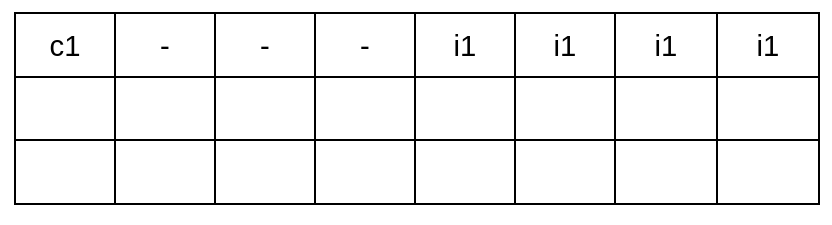
If instead of an int there was short, we would only need to add 1 byte of padding, since a short can be placed in bytes nº 0, 2, 4 and 6.
This is also related with the following type of padding. Imagine an array of the following class:
class A{
    long l1;
    char c2;
};
Elements of an array need to be in contiguous memory. Remember that when you do ptr++, you are essentially adding to that pointer the sizeof whatever you are pointing to, that way you access the next element in an array. We can imagine the memory layout of an array that has two elements of class A like this:
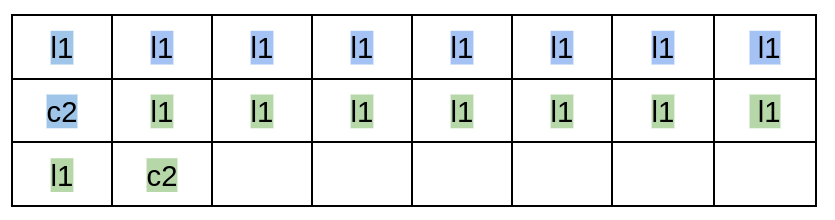
Now the second object is misaligned. We solve this with tail padding.
What tail padding does is add these empty bytes at the end, so that the total size of the class/struct is multiple of the largest member’s requirements. Now we can insert whatever number of elements of class A we desire in the array, and all of them will be aligned.
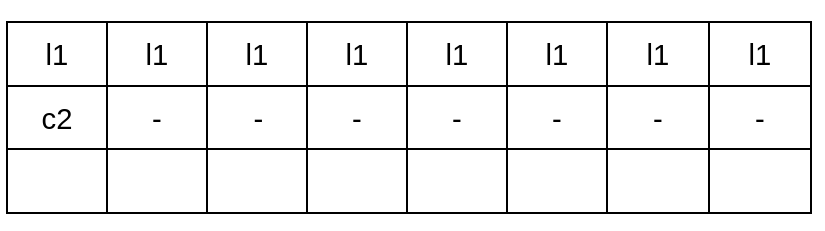
sizeof() class A is 16 bytes.
In the case below, it’s just 12 bytes. The biggest data member is an int (4 bytes), and the end of the layout is already at a multiple of 4.
class C {
    int i1;
    short s2;
    char c3;
    short b4;
    short b5;
};
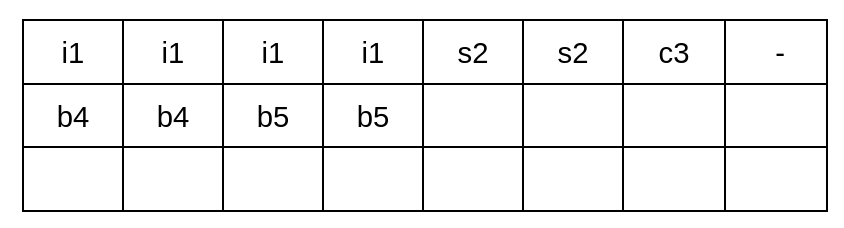
As an exercise I invite you to imagine the layout of an array of elements of class C. You will see that no data member of any element is left divided across two different blocks.
One last thing to mention for this chapter, static data members don’t need to be taken into account. Since these are stored in the data segment of the executable.
4 - Derived classes #
Moving to OOP. A derived class will have also the size of its immediate base class.
#include <iostream>

class A{
    int i;
};

class B : public A {
    int i;
};

class C : public B {
    int i;
};

int main(){
    A a;
    B b;
    C c;

    std::cout << "Size of A: " << sizeof(a) << "\n";
    std::cout << "Size of B: " << sizeof(b) << "\n";
    std::cout << "Size of C: " << sizeof(c) << "\n";

    return 0;
}
This will print: 4, 8, 12.
Pretty straightforward. Although, I want to bring back the empty class. I stated that the size of an empty class is always 1 byte. But, what if we inherit from one? Are we adding 1 byte?
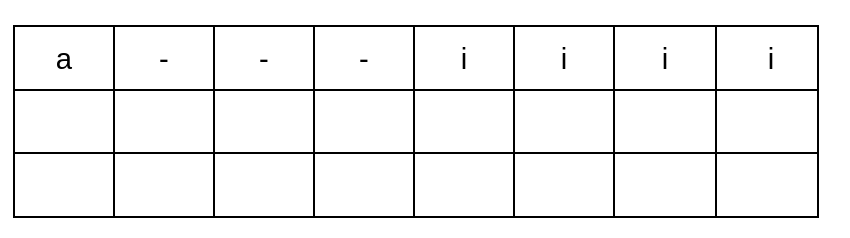
Not really, this is because of the Empty Base Optimization, which is just not adding that byte to the size. Don’t misunderstand me, the individual size is still 1. Look at the following snippet of code.
class A {
};

class B : public A {
    A a;
    int i;
};
There is no extra size coming from the inheritance, but a data member of type A will still have size one. Layout of class B:
5 - Virtual functions #
To understand why virtual functions are relevant to this matter, we first need to comprehend them.
In the code snippet below we declare a base class A that has a virtual function foo(), then a derived class B. If we call this function through the child class, since it hasn’t implemented one, it will call the one from A.
class A{
    public:
        virtual void foo(){
            std::cout << "Hello from A" << std::endl;
        }
};

class B : public A{

};

int main(){
    B b;

    b.foo(); // this prints "Hello from A"

    return 0;
}
The way B is able to know what to call for each function, is thanks to the virtual pointer and the virtual table. The virtual table is a table that has pointers to the different virtual functions the class has access to, that way it’s able to track dynamic polymorphism. And the virtual pointer is a pointer that points to this table.
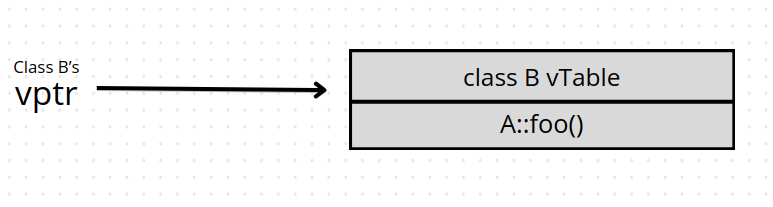
A more complete example would look like this.
class A {
    public:
        virtual void foo(){}
        virtual void goo(){}
};

class B : public A {
    public:
        void goo() override {}
};
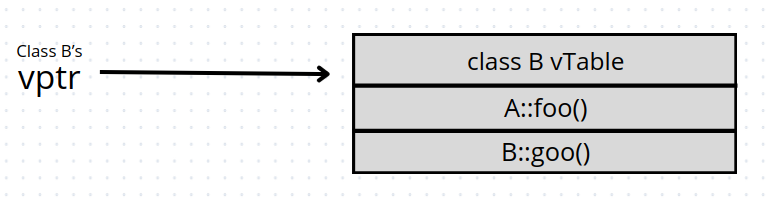
So if we call foo() through a type B object, it will call the original implementation from A. And if we call goo(), it will execute the implementation of class B.
This virtual pointer has to be considered for the size of a class. We can see this better with an example.
class A{
    public:
        int i1;
        virtual void foo(){}
};

class B : public A{
    public:
        int i2;
};
Starting with A, the size will be 8 bytes of the vptr + 4 bytes of the int, and don’t forget about the tail padding, since the virtual pointer also counts as a data member now. The memory layout looks like this for the class.
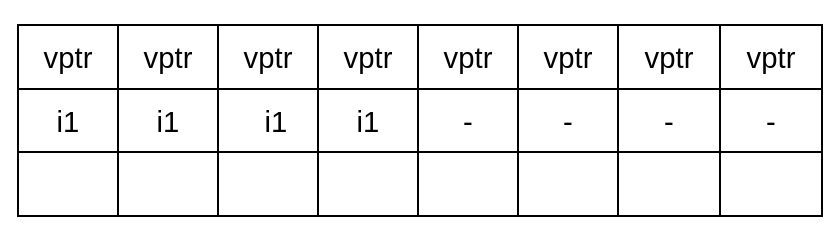
Moving to B. We already know that derived classes take also the content from the most inmediate base class, and since it has a virtual function (foo(), located in A), we need to add the vptr.
A couple of things related to this. First, the virtual pointer is just added once, each class should just point to each own virtual table. Second, you don’t just add the size of A to B. You shouldn’t look at A as a constant block, in this case we can remove the previous padding that we did and insert there B’s integer. The memory layout will look something like this.
(Despite the vptr being in the same position it now points to the virtual table of B).
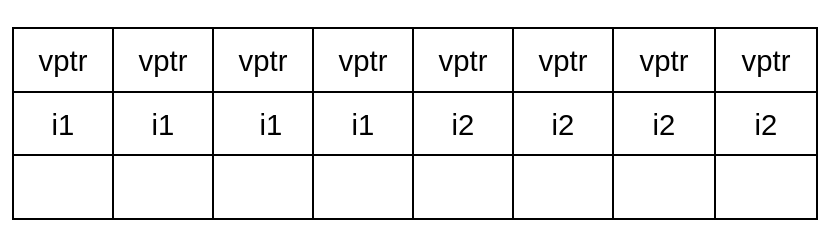
In fact, both classes have the same size, 16 bytes.
This last thing I mentioned, about removing the tail padding of the base class for creating the child, doesn’t work with MSVC (Microsoft’s compiler). Unlike Clang or GCC, MSVC does not follow the Itanium C++ ABI, where this is defined.
6 - Virtual tables with multiple inheritance #
There is a case when there is not just one virtual pointer, when there is a derived class that inherits virtual functions from multiple base classes. Let me explain this with an example.
class A {
    public:
        virtual void foo() {}
};

class B {
    public:
        virtual void goo() {}
};

class C : public A, public B {
    public:
        virtual void hoo() {}
};

int main(){
    return 0;
}
We have two separate base classes A and B, with virtual functions. Then class C, that inherits from both of them, and has its own virtual function. The interesting part in here is the layout of class C, we can see it in two ways.
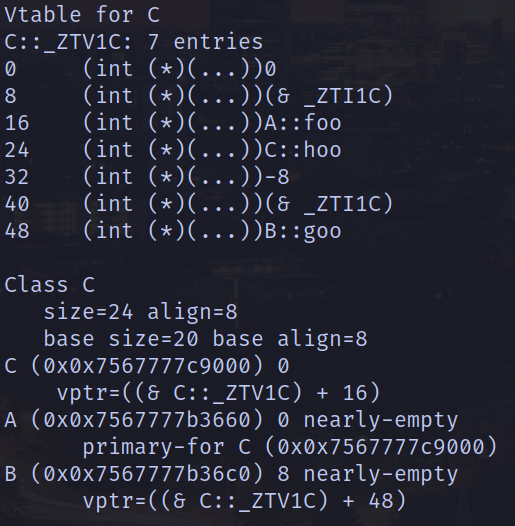
We can compile the file with GCC activating a flag to see the layout: g++ -fdump-lang-class -c main.cpp. This will create a .class file, where we can see the layout of C and its virtual table.
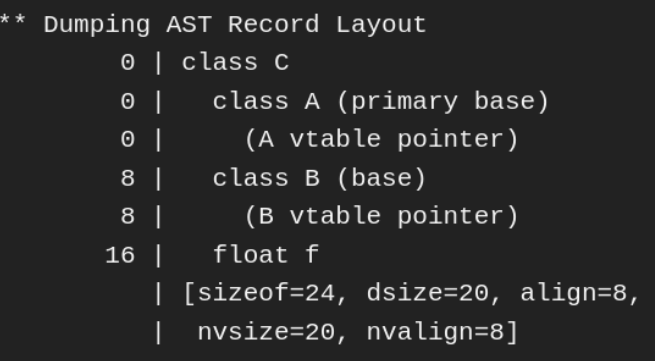
And if we use the clang compiler we can make use of the flag: -Xclang -fdump-record-layouts
In my opinion the best way to see it, is combining the virtual table of class C, that GCC printed, and the class layout of clang in something like this:
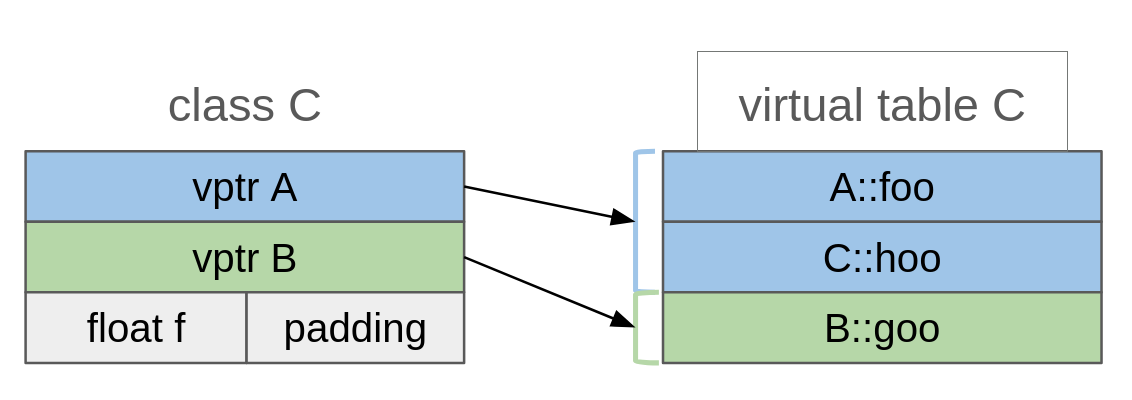
What we see is that we have two different virtual pointers to the same table, with the exception of a different offset. This is because of upcasting, picture the following program.
class A {
    public:
        virtual void foo() {}
};

class B {
    public:
        virtual void goo() {}
};

class C : public A, public B {
};

void func(B* b){
    b->goo();
}

int main(){
    C c;
    func( &c );

    return 0;
}
func() takes a pointer to an object B, but, we pass one to an object C. The compiler won’t create a pointer to B, it will add some offset to the one we passed, to make a gimmick. That’s why we need distinction between the two vptrs.
A rule of thumb we can use for this: a derived class will have as many virtual pointers, as base classes with virtual functions.
Virtual tables can get something more complicated than this, and I think they deserve their own article so we can study them more calmly. For the moment we can make use of that rule.
What for #
Back to the begininng. I said that learning about this can help us understand casting. Let’s see it.
One of the most agressive forms of casting C++ has, is reinterpret_cast, with it we can reinterpret the bits of an object as another. Of course, this is the most dangerous type of conversion, since it’s very easy to lead to undefined behaviour. That’s why C++ provides the developer with different resources to facilitate this.
For example, in the code below, we can use the type trait std::is_layout_compatible to check if it would be safe for a pointer of class B to point to the bits of A. The conditional resolves to true, giving us green light for the casting.
#include <type_traits>
#include <iostream>

class A{
    public:
        int i = 10;
};

class B{
    public:
        int i;
};

int main()
{
    A a;
    B* b;

    if( std::is_layout_compatible<A, B>() ){
        b = reinterpret_cast<B*>( &a );

        std::cout << a.i << std::endl; // 10
        std::cout << b->i << std::endl; // 10
    }

    return 0;
}
But what if A had a virtual function? Or, if A was a derived class, you can ask yourself: is its base class empty? Does A inherit any virtual functions? You can figure this without the need of any type trait!
This won’t cast, because the char makes the layout of A different from B’s.
class Base{
     char c;
};

class A : public Base {
    public:
        int i = 10;
};

class B{
    public:
        int i;
};

int main()
{
    A a;
    B* b;

    if( std::is_layout_compatible<A, B>() ){
        b = reinterpret_cast<B*>( &a );

        std::cout << a.i << std::endl;
        std::cout << b->i << std::endl;
    }

    return 0;
}
But, this will work perfectly.
#include <type_traits>
#include <iostream>

class Base{
    static int i;
    void foo(){ }
};

class A : public Base {
    public:
        int i = 10;
};

class B{
    public:
        int i;
};

int main()
{
    A a;
    B* b;

    if( std::is_layout_compatible<A, B>() ){
        b = reinterpret_cast<B*>( &a );

        std::cout << a.i << std::endl;
        std::cout << b->i << std::endl;
    }

    return 0;
}
Closing #
The purpose of this article is not to replace these language facilities with some off the top of your head layout calculation. No one implements a sorting algorithm everytime they want to classify an array, but I think most of us would agree that having had to implement quicksort, bubblesort… in the past, gives you a better understanding of them. So I hope this serves you the same way.