C++ lock_guard vs unique_lock, use cases #
When writing multithreaded applications there is an inevitable class that will often need to be used in our code, std::mutex. This is a synchronization class that is used to protect shared data from being accessed by multiple threads at the same time. If you don’t know much about it, you can either read what they are here, or be content with the definition that a mutex is like a padlock.
Locking a mutex can be done in a lot of ways, starting with the manual one:
my_mutex.lock();
do_some_operation();
my_mutex.unlock();
Of course this is not the safest approach, what if do_some_operation() function fails or throws an exception and the unlock is never done? We would leave the mutex locked, leaving a resource or a part of the code inaccessible for the rest of the threads.
This is why the C++ standard includes the class std::lock_guard, this wrapper is designed to unlock the mutex that is protecting once it is destroyed. In the following code snippet it wouldn’t matter if func_that_might_throw() throws an exception or it doesn’t. Because no matter what, once the lock_guard object goes out of scope, in its destructor is implemented to also release the mutex.
void some_operation(){
    std::lock_guard<std::mutex> lock( my_mutex );

    func_that_might_throw();
}
A disadvantage from using lock_guard is that the lock is always done at construction time or, before, using std::adopt_lock. By using it we can first lock it manually, then tell lock_guard to assume the calling thread has already ownership of the mutex.
void lock_before(){
    my_mutex.lock();

    std::lock_guard<std::mutex> lock( my_mutex, std::adopt_lock );
}
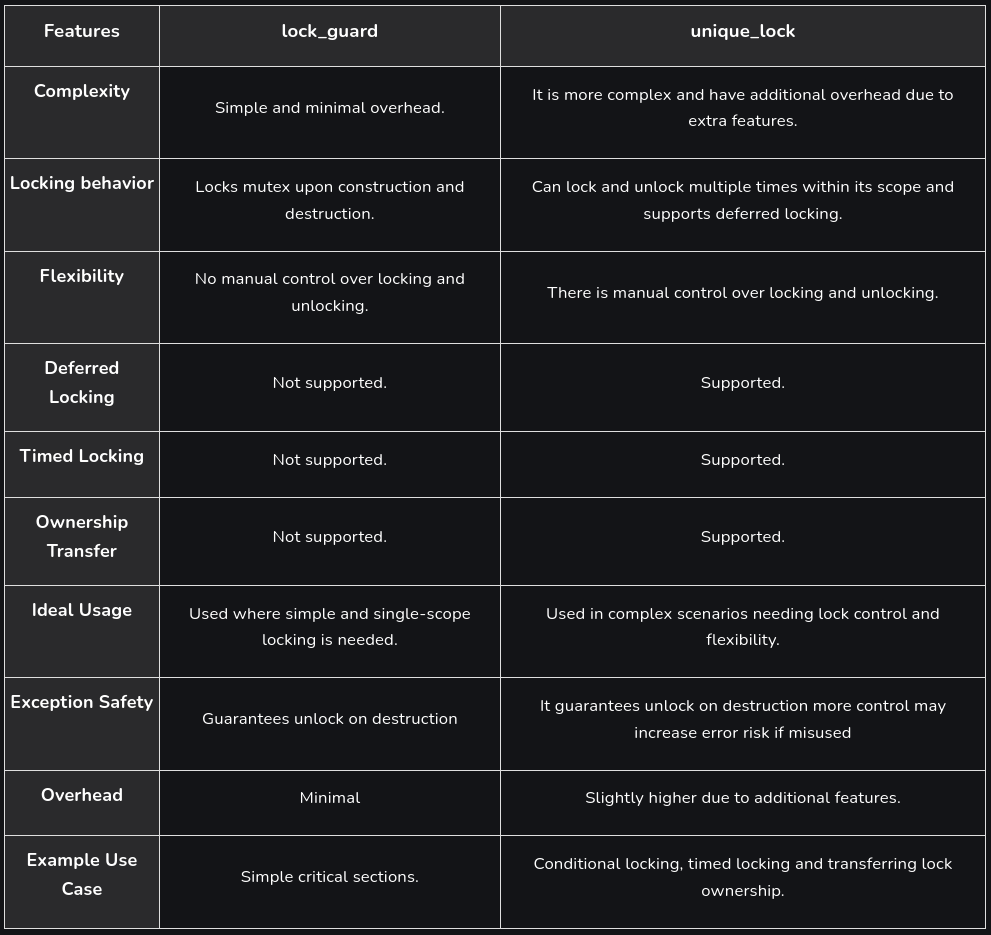
So, what is std::unique_lock? This class is often seen as the big brother of lock_guard. Providing more flexibility but at a bigger cost, we are allowed to do manual lock and unlock if desired to, this can be useful in complex scenarios where a bigger control is needed.
Another feature of unique_lock is the deferred locking. Now we are able to construct the object and doing the lock after, at any desired time.
void some_operation(){
    std::unique_lock<std::mutex> lock(my_mutex, std::defer_lock); //We haven't locked it yet

    //... Manual locks and unlocks
    lock.lock();
    //...
    lock.unlock();
    //...
    lock.lock();
}
Same as with lock_guard, it will be released once it goes out of the scope, if we haven’t done it ourselves.
However, this is not everything, there is still another feature unique_lock and lock_guard differ in, ownership transfer. As we have seen unique_lock doesn’t need to own the lock of a mutex, we can create the object and defer the lock. This is very useful if we want to transfer the ownership of that “lock” from one unique_lock to another.
When is this useful? Well imagine that you have a shared resource and you need to do two things with it: preprocessing and postprocessing. The lock needs to be held the whole time. Take a look at the code snippet:
std::mutex my_mutex;
int shared_data = 0;

std::unique_lock<std::mutex> preprocess_data(){
    std::unique_lock<std::mutex> my_lock(my_mutex);

    shared_data = 100;

    return my_lock;
}

void postprocess_data(){
    std::unique_lock<std::mutex> my_lock = preprocess_data(); //The transfer is done

    shared_data += 10;
}
Maybe a more complex schema where the usefulness of the ownership transfer can be seen is handing over the task to another thread. Executing the second part there, and not just in another function.
This wouldn’t be possible with a regular lock_guard, because the mutex would be unlocked when the preprocess_data() function returned. That would leave a gap for vulnerabilities until we locked again the mutex.
Is worth mentioning that unique_lock is neither CopyConstructible nor CopyAssignable and that this whole ownership transfer can be a bit tricky to understand in C++. In our case we didn’t have to specify std::move when returning because of how rvalues and lvalues work. So I suggest you take a look on how they work.
Anyway, there are multiple ways for locking a std::mutex that we haven’t covered here. I leave you here a small chart that I’ve found in this geeksforgeeks article for the two that we’ve covered.